Service maps to visualize problems
Sometimes, a picture is worth 1000 words. With service map views in AppManager® Control Center, you can see what is and isn't affected by a problem.
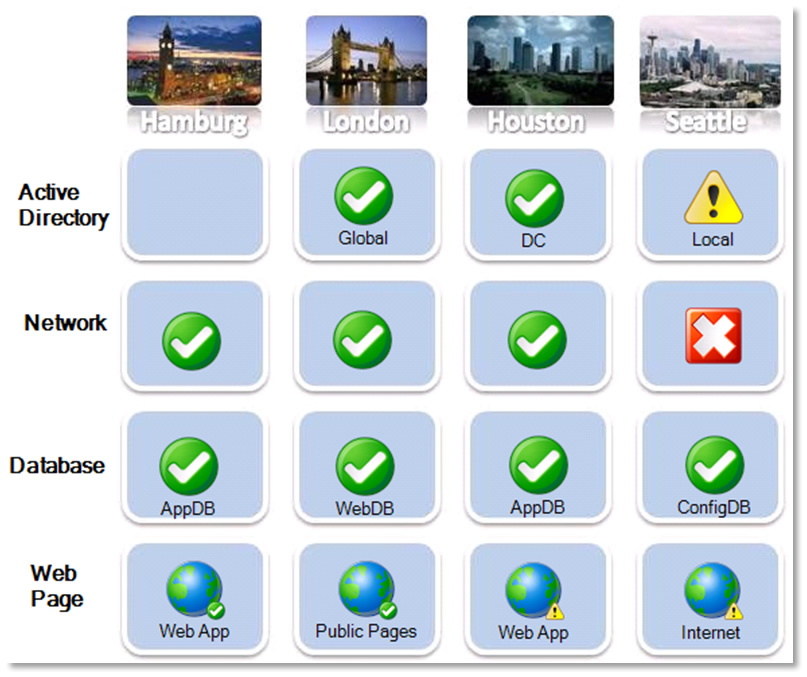
Service Map views
Quickly build custom views
Service map views can be easily built by dragging and dropping objects from the tree view into a designer, where those components are represented as icons. A Service Map view provides a visual representation of the relationships between different objects you monitor with AppManager, and displays event conditions on these objects.
Service Map views also allow you to respond to those events. You can use a single Service Map view to visually represent and monitor all of the computing and network infrastructure that underlies a particular business process.
For example, you can create a Service Map view of the Web servers, database servers, and databases that customers use to make purchases. From a Service Map view, you can also:
- Manage events
- Manage jobs
- View details on discovered resources
- Manage custom properties
- Manage data streams
By creating a visual representation of the relationships between the components in your infrastructure, you can understand how problems with a specific component are likely to affect its related business processes.
Let's Talk
Welcome, Want to talk to someone? Call our Sales team or request a call and we'll get right back to you.
- Sales: (888) 323-6768
For support information, please visit Technical Support.